Den: Initial Setup
How this site was set up and what systems does it use. In other words, if you wanted to make something similar and you have at least half of my brain - this is where you go.
Preambule
The first time setting
(Parenthethies)
Then,
Now, after
The Principle
What
Hugo
If you’re making a
You install Hugo (which is written in Go, whatever that means), set it into a folder and you can launch a local test-build of it by opening the folder of your site-project and writing hugo server into the console. After that you’ll be able to view how your site works by going to http://localhost:1313/ in your web browser.
But why the need for some static-site generator? Why not write it all by hand? Every web page is an html file. Every… uuuh… paragraph, highlighted text, image, element - has to be coded in through html tags, which will hook up to css styles and js scripts. To write all that by hand would mean writing something that looks like this:
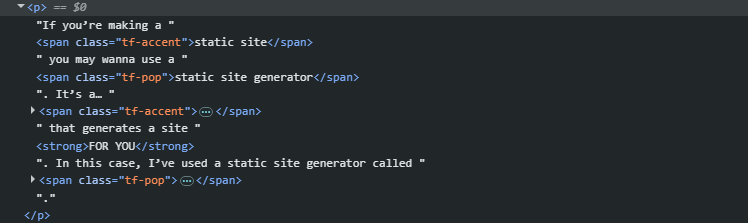
Yeah. Nobody’s gonna write that shit by hand. You’d usually use some kind of an
It’s default mode relies on markdown (or .md) pages to turn into web-pages, so you will probably need an editor that produces markdown pages. I used exactly that kind of thing, and it was called OBSIDIAN
Obsidian
I’ve used obsidian for a few years now, it’s a neat note-making-taking app which renders your notes as markdown files. Writing documents in obsidian is pretty much like writing in Microsoft Word is 99% of formatting options were stripped from it. It’s easy, pretty and accessible enough to not get in your way, and all the fancy shmancy styling and rendering of your pages will have to be handled by css and html.
What Obsidian allows you to do is set up a hierarchy of documents and folders, put cross-reference links into them, organize and edit everything to your heart’s content AND there are a shitload of community plugins if you need even MORE stuff. You can build a personal worldbuilding wiki in Obsidian, use it as a diary, or as documentation for a project, or… I don’t know what else. I’ve used it for those three.
So the pipeline becomes thus:
You dump Obsidian and Hugo into one folder -> you write your site pages in obsidian markdown -> hugo gathers your pages and makes a site out of them
Markdown
What’s markdown? It’s a… Something that’s called markup language. It’d not like a coding language, it doesn’t perform functions or executes code. It’s just used to easily style a text in a simple, generalized way according to a set of rules. If everyone agrees to this set of rules and everyone writes all of their documents in markdown - then one .md page can be used in any place, any app, and it will result in the same page.
**bold text**
-italic text-
==highlighted text==
Markdown really works with only simple conventions. Italic/bold text, paragraphs, footnotes, etcetera. You can’t color a text or do some weird funky shit to it in Markdown. Simplicity is the price of accessibility.
Hugo-Html Connection
Working with this pipeline will mean wrangling these types of files:
- Markdown - your dough, your uncooked site pages made with Obsidian
- Html - mainly used for
Installation and Setup Process
Installation of Hugo
There are several ways to install Hugo. Many of the recommended ones included words and terms that scared me so I pick the stupidest, most straightforward one, which you can find over here1.
Download the zip archive with the latest Hugo, extract it into some folder, and then add the directory with it’s .exe to the PATH ENVIRONMENT VARIABLE! “What in the fucking fuck is that” I hear myself ask. Uuuuuuh it’s a fucking… list of… paths which… can be called like commands straight in the windows console (the BLACK one, the cmd). The process of THAT whole shmoozy looks somewhat like this:
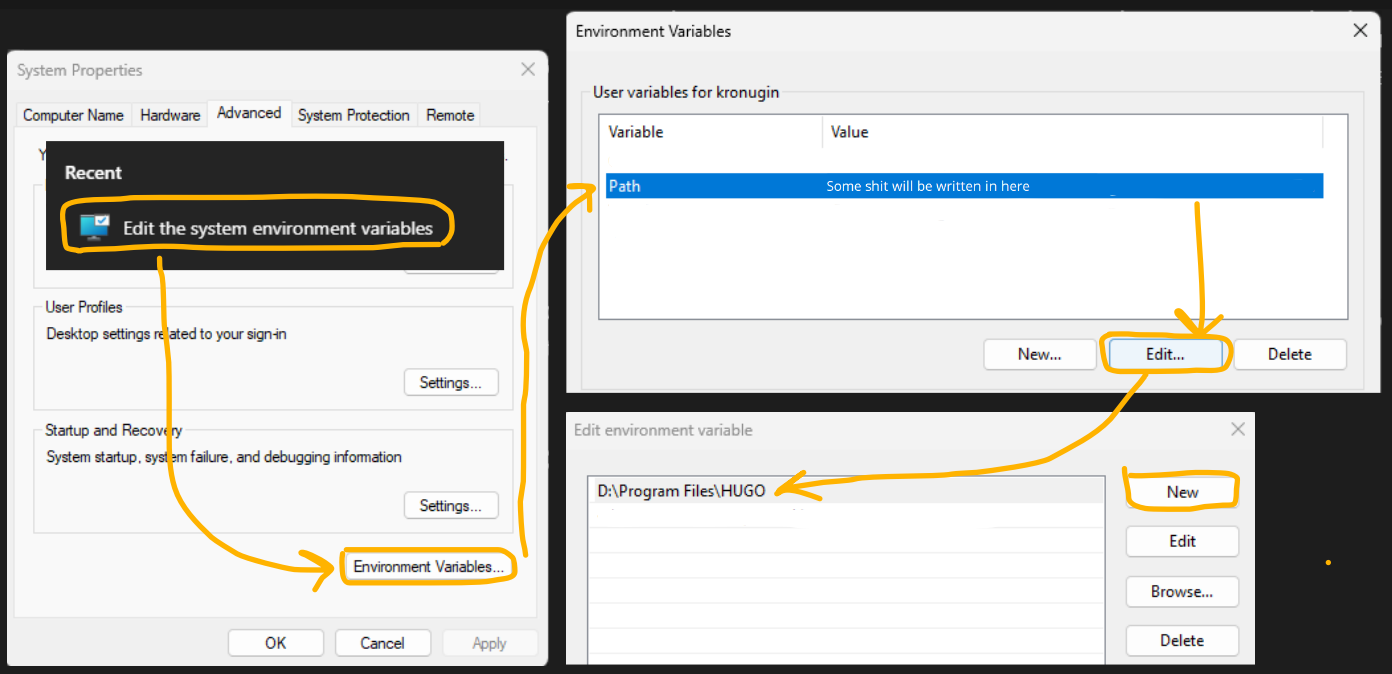
NOW you can launch your console, write something like hugo version and it should respond with information about your installed hugo stuff.
Creating Hugo project
From now on you can create a folder anywhere where you want you site files to be and open windows cmd console in that folder. Then you type something like hugo new site TestSite into it, press Enter and you should get sumthin like this:
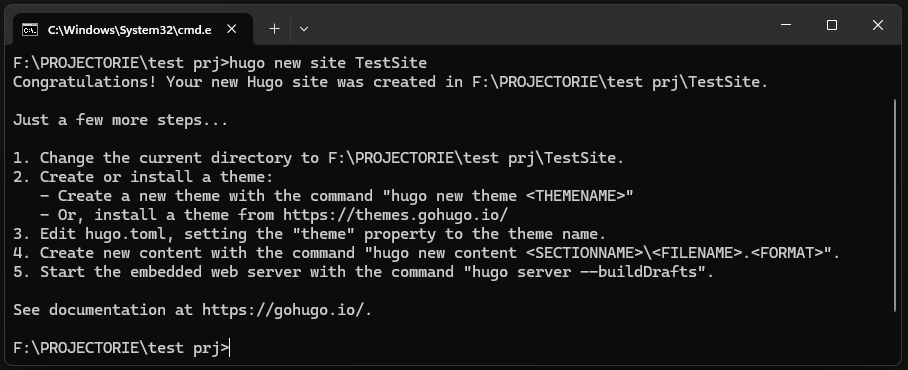
It will create a project folder called TestSite with subfolders like: archetypes, assets, content, data, layouts, static, themes and, what’s most important - hugo.toml file. That’s the hugo config which has a bunch of params related to the site AND to the theme you’ll be using. so editing that file will come uuuuh later.
Set Obsidian into the same folder as Hugo-generated site
Just set up an Obsidian vault into the folder you’ve created before (TestSite)2. Now that folder will have all the stuff from Hugo PLUS all the stuff from OBSIDIAN.
All of the site pages written through obsidian must be created inside CONTENT folder, nowhere else. Hugo takes whatever is in that folder and bakes it into a site. Even tho obsidian has access to all other folders - it must be used almost entirely inside CONTENT.
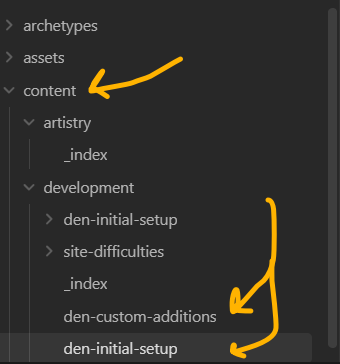
Subfolders in the content folder are the site’s SECTIONS. Inside them can also be subsections. Any actual page inside any of those folders will become a page on the site.
Add Github to this mix
Nothing more than that, create a github repository3 into the same folder so now it will contain:
- Folders and files from Hugo (assets, content, data, layouts, public…)
- Folders and files from Obsidian (.obsidian)
- Folders and files from Github (hidden .git folder and a .gitignore)
Now it all works. My .gitignore looks like:
# Generated files by hugo
/public/
/resources/_gen/
/assets/jsconfig.json
hugo_stats.json

# Executable may be added to repository
hugo.exe
hugo.darwin
hugo.linux

# Temporary lock file while building
/.hugo_build.lock

# Obsidian stuff
/content/.obsidian/
/.obsidian/
/templates/

# Misc Stuff
/.idea/
Files generated by hugo are local build files made for testing, so github does not need them, the site will be rebuilt onto Cloudflare from Hugo source files anew.
There is a pipeline that requires setting up something to do with Github actions? To make Github build the Hugo site? But I don’t know about that. I’ve used Cloudflare’s mechanisms to do the last step.
Domain
To have a site running you must get a domain. sitename.com is a domain name. It must be paid for periodically, because it’s being maintained on some server somewhere in the world. You can get one for around 10 bucks a year so it’s not exactly a luxury.

I personally went with a Cloudflare domain ending in .com. That’s where THIS exists right now.
Cloudflare Deployment
Cloudflare has an option to work With Hugo+Github composition through it’s “Workers & Pages” feature. All of it is done automatically after you choose a few options in your build:
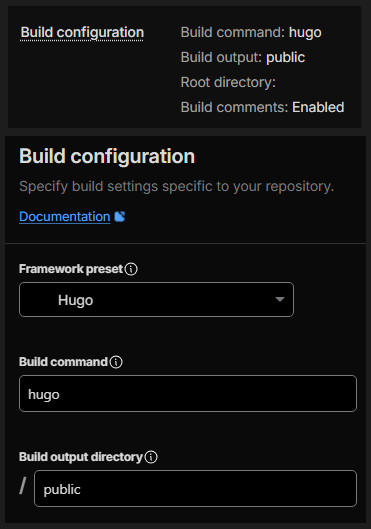
The process of configuring this build can be further read about on Cloudflare Documentation Site4, which I have severely underused. If you put ‘Hugo’ in all the right places, and your hugo and obsidian and github work - the next time the site’s build is pushed to github - Cloudflare will deploy it and produce a working, breathing website!
Install a theme for Hugo
The site needs visuals. Visuals are governed by a ’theme’. Think of it as a collection of html+css+javascript instructions that define how does the site look, how it behaves, how do the pages look, how do the lists look, where are the navigation menus, ARE there navigation menues?
Without a theme a web site looks not much better than a word document. Even worse that that, more like a .txt with some blue color for links. Go to the Hugo themes registry5, pick a theme you like, check the demos, read it’s documentation, decide whether it has the basic set of features you want… and then download it.
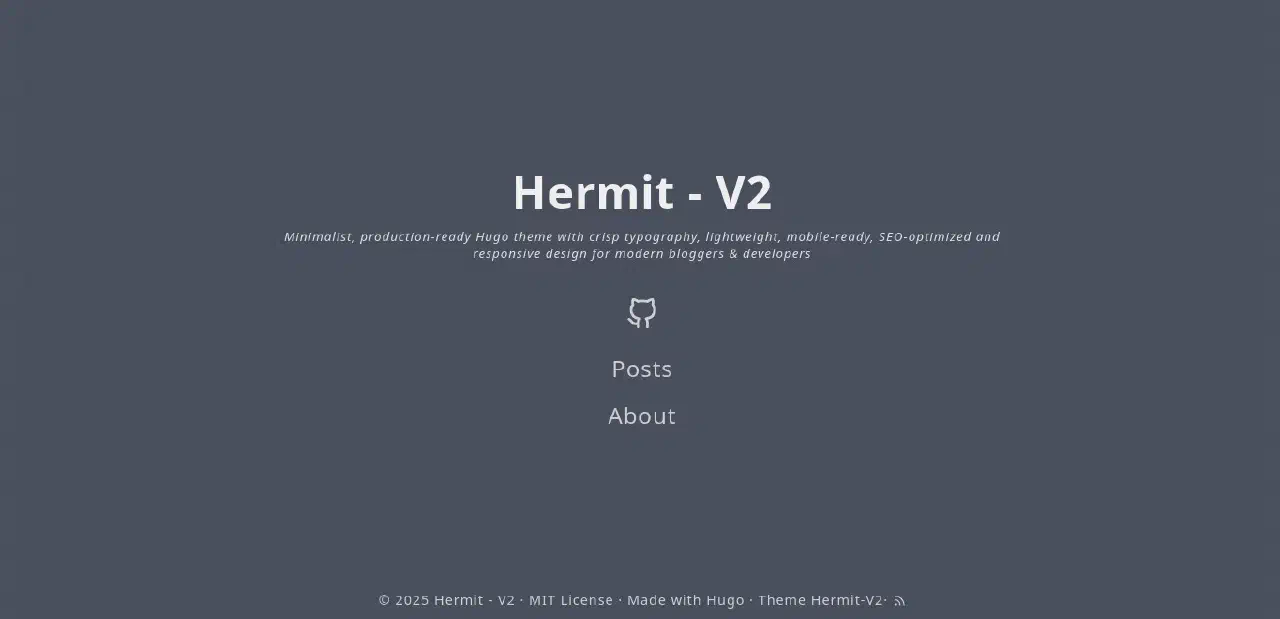
I’ve personally landed on
Summary or TLDR
I remember watching a few videos on youtube about the whole process. Here they are:
- https://youtu.be/5iFUkZwTi6s?si=rOVsKqYjXryt4evx
- https://youtu.be/LIFvgrRxdt4?si=Byg4SPF5jXWGiOOt
- https://youtu.be/6FoPpUnnyqM?si=O0HdENY7w6Hvuf7f
-
Hugo installation documentation: https://gohugo.io/installation/windows/#prebuilt-binaries . It says ‘Prebuilt binaries’. I dunno what the fuck does that mean, but it seems to be the way to install Hugo without some foken additional ‘package managers’. How about you manage MY package? ⬏
-
Obsidian vault setup guide on the official obsidian help site: https://obsidian.md/help/vault . It’s not really anything difficult but the site itself if good to read up on what Obsidian can do (and how it can be used for the site). ⬏
-
Github repository setup on Github Docs: https://docs.github.com/en/repositories/creating-and-managing-repositories/quickstart-for-repositories . Linking online Github repository to the folder on disk is always a blur for me. I did it 10-20 times by now and I still don’t remember the exact steps, so I always end up re-reading the guides on how to do it. Tis a bit tragic. ⬏
-
Cloudflare Docs: https://developers.cloudflare.com/pages/configuration/build-configuration/ . Or just find a video on Youtube about the whole process. ⬏
-
Hugo themes: https://themes.gohugo.io/ . Dunno if there are other sites but this is the main one. ⬏
-
Hermit-V2 demo site which also acts as it’s own guide/documentation resource: https://1bl4z3r.github.io/hermit-V2/en/posts/ ⬏